> ## Documentation Index
> Fetch the complete documentation index at: https://thehyperstack.com/docs/llms.txt
> Use this file to discover all available pages before exploring further.

# Email-less Credential

# Issuing certificates and badges without email address

You can issue certificates and badges without a recipient's email address, and they can claim their credential using the provided claimable URL

### How to issue email-less credential?
<Steps>
  <Step title="Go to Create Credential page" />

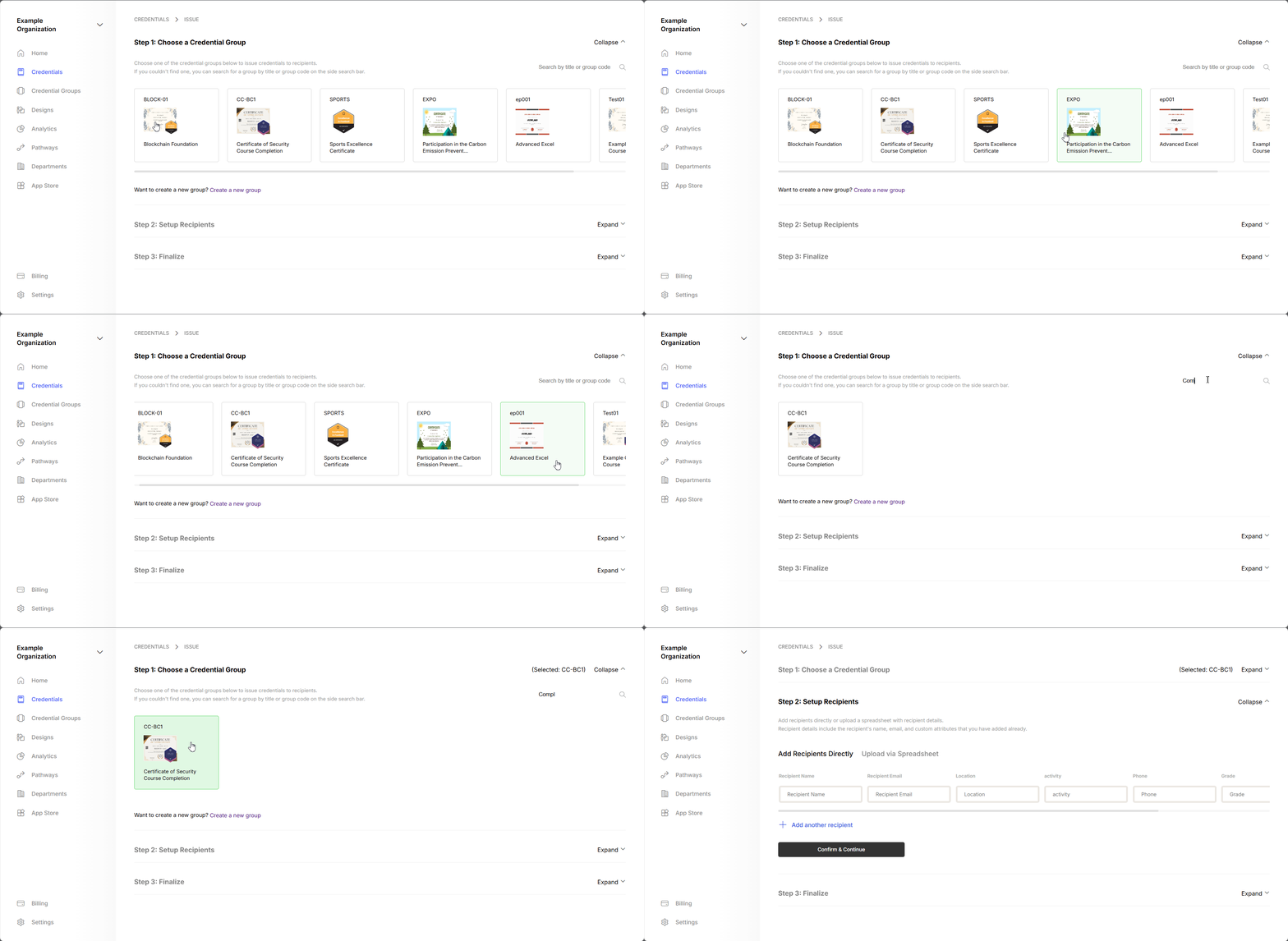
  <Step title="Select the Credential Group as usual">
    <Frame>
      <img src="https://mintcdn.com/hyperstack/hEnRmZQQlgTIvjyK/images/issuing-credential-2.gif?s=a548de1a25516250860ef7162a5376be" alt="Screenshot of a deployment confirmation message that says All checks have passed." style={{ borderRadius: "0.5rem" }} width="1910" height="933" data-path="images/issuing-credential-2.gif" />
    </Frame>
  </Step>

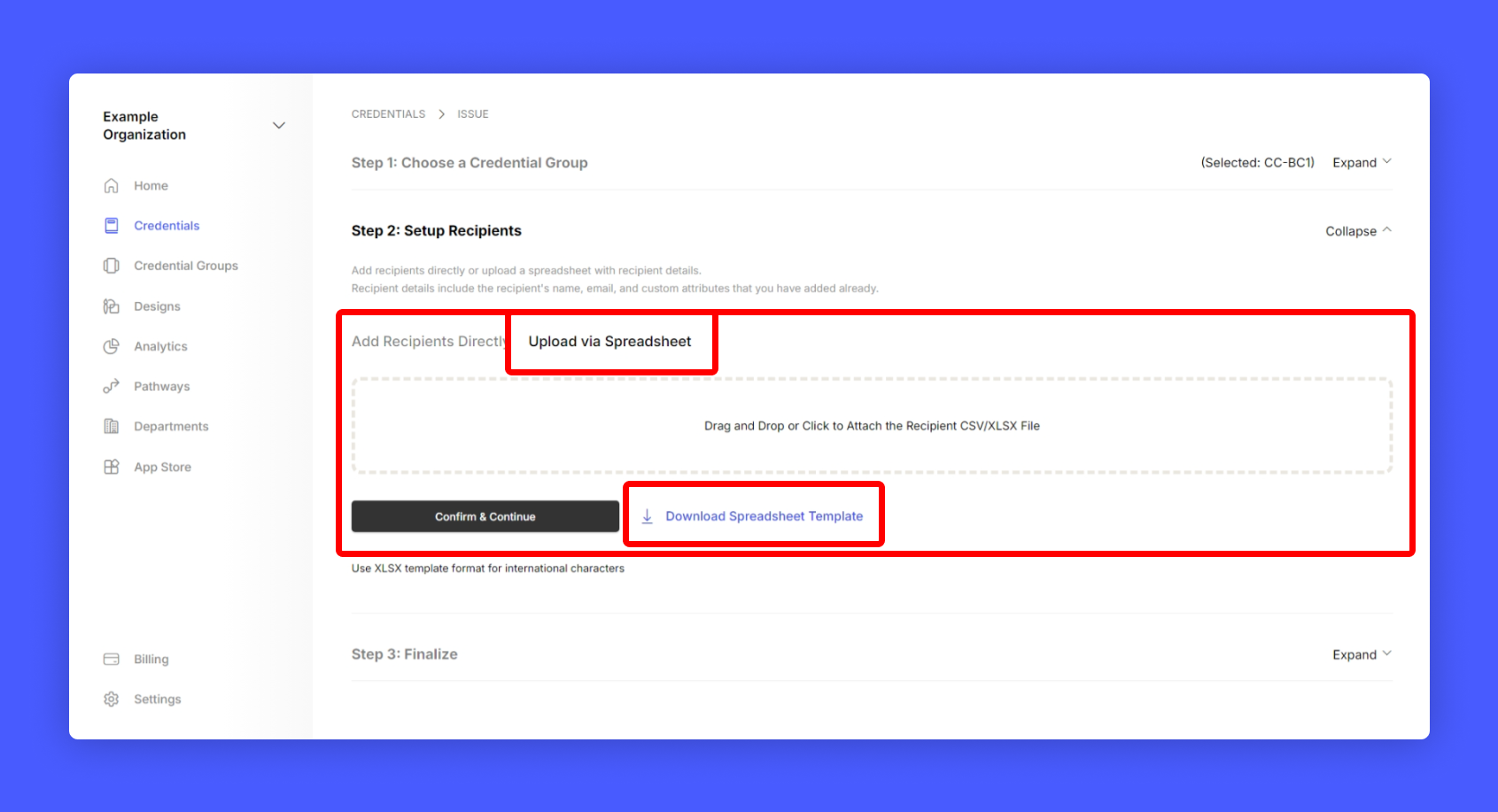
  <Step title="Download the template">
    <Frame>
      <img src="https://mintcdn.com/hyperstack/hEnRmZQQlgTIvjyK/images/issuing-credential-3.1.png?fit=max&auto=format&n=hEnRmZQQlgTIvjyK&q=85&s=9f4be8ca77b84a889a35ef35cd20eb45" alt="Screenshot of a deployment confirmation message that says All checks have passed." style={{ borderRadius: "0.5rem" }} width="1691" height="917" data-path="images/issuing-credential-3.1.png" />
    </Frame>
  </Step>

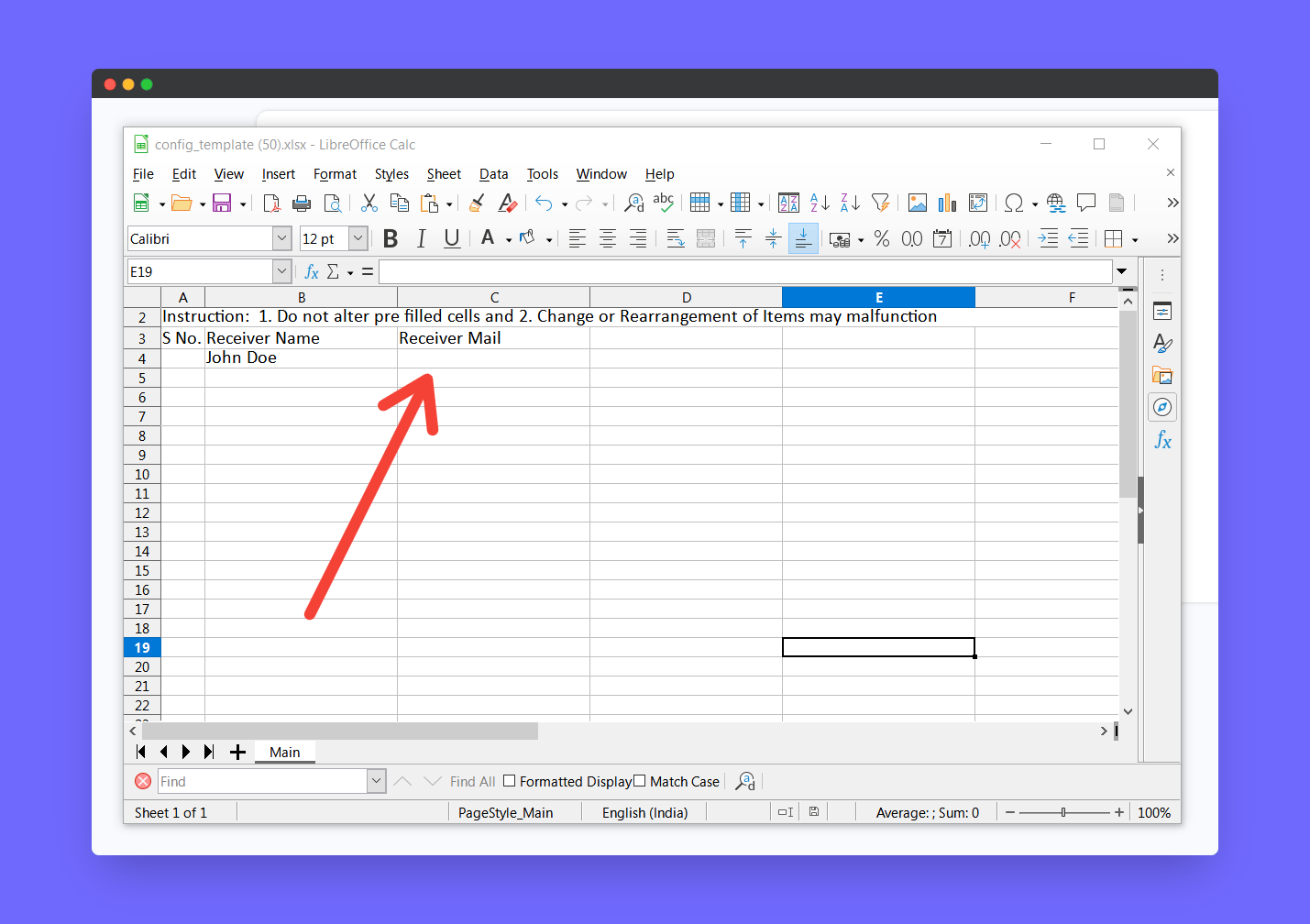
  <Step title="Open the downloaded template and fill every column except the receiver mail">
    <Frame>
      <img src="https://mintcdn.com/hyperstack/hEnRmZQQlgTIvjyK/images/email-less-credential-2.png?fit=max&auto=format&n=hEnRmZQQlgTIvjyK&q=85&s=3e92f77d275c5bc134066320e8bd1ae3" alt="Screenshot of a deployment confirmation message that says All checks have passed." style={{ borderRadius: "0.5rem" }} width="1429" height="1008" data-path="images/email-less-credential-2.png" />
    </Frame>
  </Step>

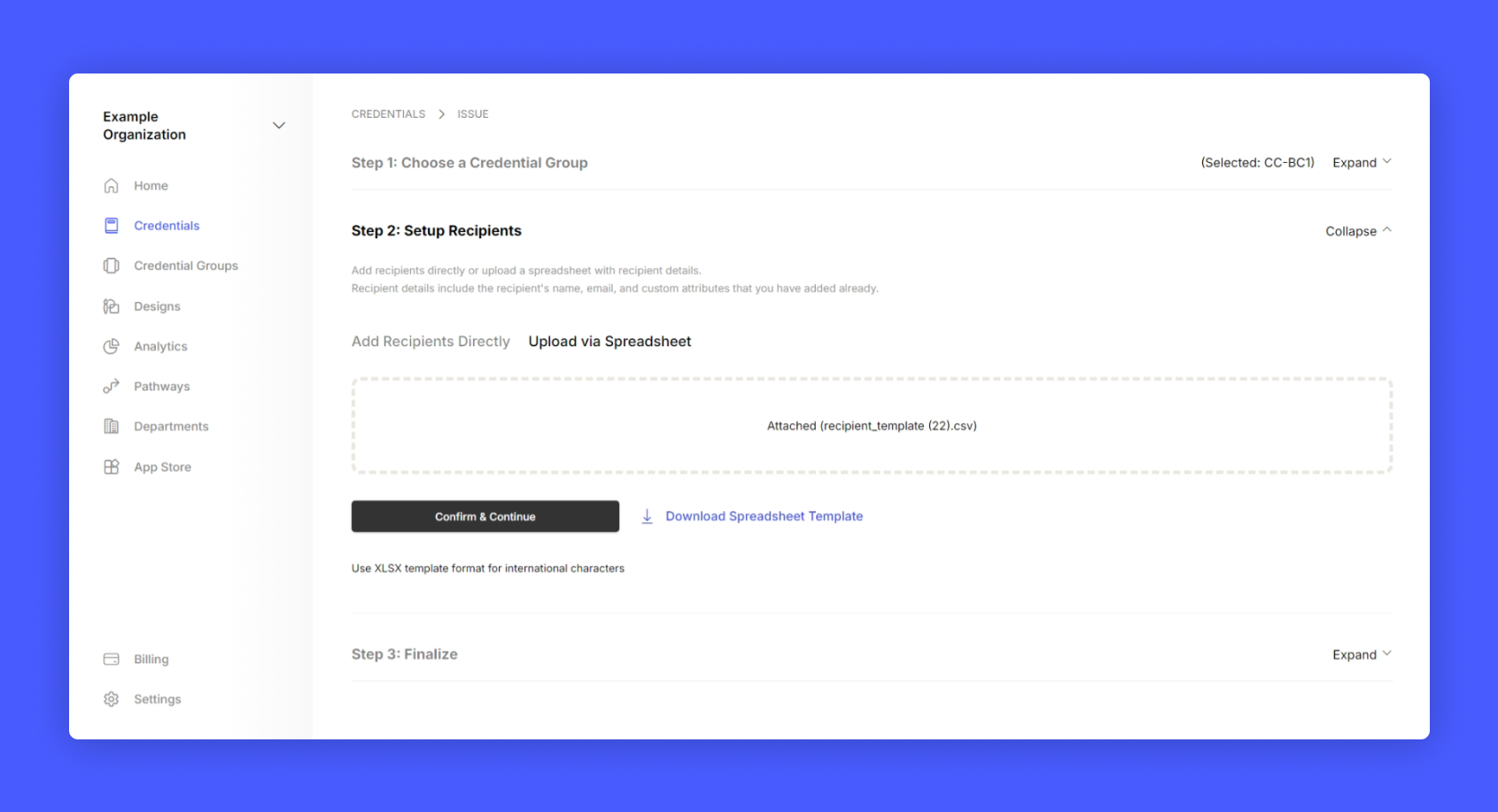
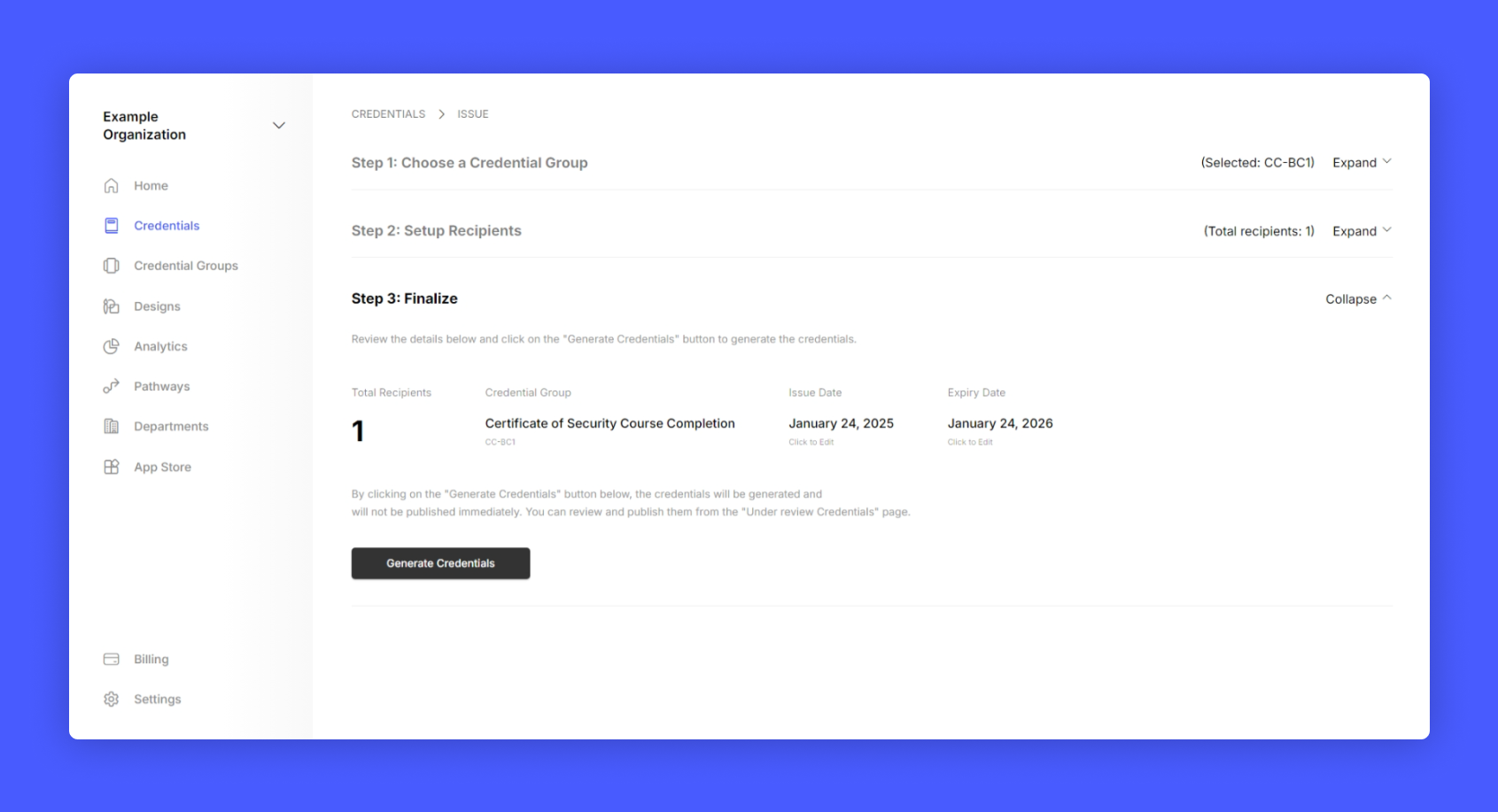
  <Step title="Upload the spreadsheet, continue to next step and click generate credential">
    <Frame>
      <img src="https://mintcdn.com/hyperstack/hEnRmZQQlgTIvjyK/images/issuing-credential-5.png?fit=max&auto=format&n=hEnRmZQQlgTIvjyK&q=85&s=4bc06e63bbe89bc7be5dc6f78c5eede8" alt="Screenshot of a deployment confirmation message that says All checks have passed." style={{ borderRadius: "0.5rem" }} width="1691" height="917" data-path="images/issuing-credential-5.png" />
    </Frame>

    <Frame>
      <img src="https://mintcdn.com/hyperstack/hEnRmZQQlgTIvjyK/images/issuing-credential-6.png?fit=max&auto=format&n=hEnRmZQQlgTIvjyK&q=85&s=5e390ceb7c2cca0feb4393d1dc9fdcea" alt="Screenshot of a deployment confirmation message that says All checks have passed." style={{ borderRadius: "0.5rem" }} width="1691" height="917" data-path="images/issuing-credential-6.png" />
    </Frame>
  </Step>

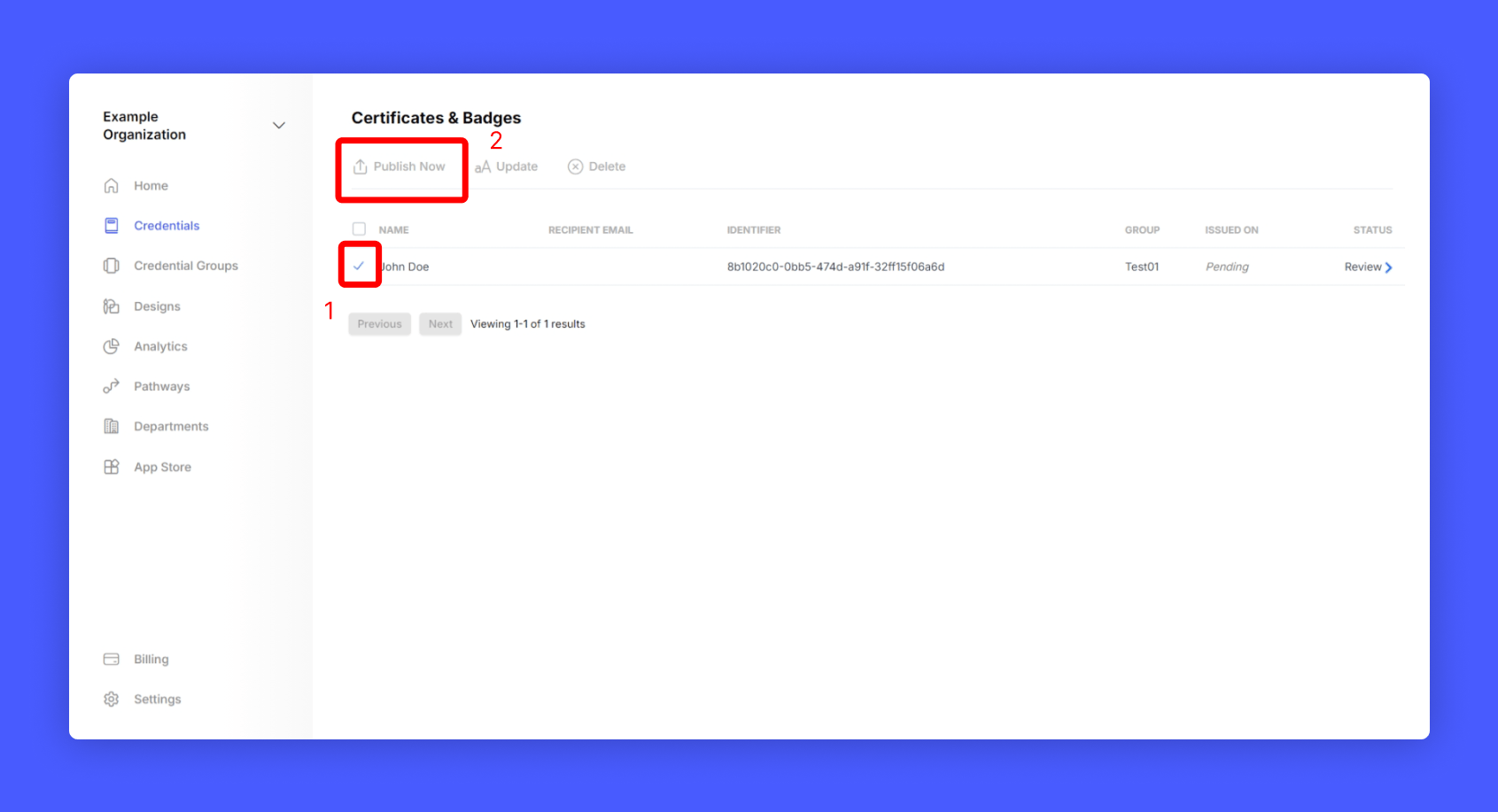
  <Step title="Review the credential and publish it">
    <Frame>
      <img src="https://mintcdn.com/hyperstack/hEnRmZQQlgTIvjyK/images/email-less-credential-5.png?fit=max&auto=format&n=hEnRmZQQlgTIvjyK&q=85&s=d451a155b1811a364dec110095d61f7d" alt="Screenshot of a deployment confirmation message that says All checks have passed." style={{ borderRadius: "0.5rem" }} width="1691" height="917" data-path="images/email-less-credential-5.png" />
    </Frame>
  </Step>
</Steps>

Hurray! You have successfully created email-less credential in Hyperstack!

## Retrieve claimable URL for the credential
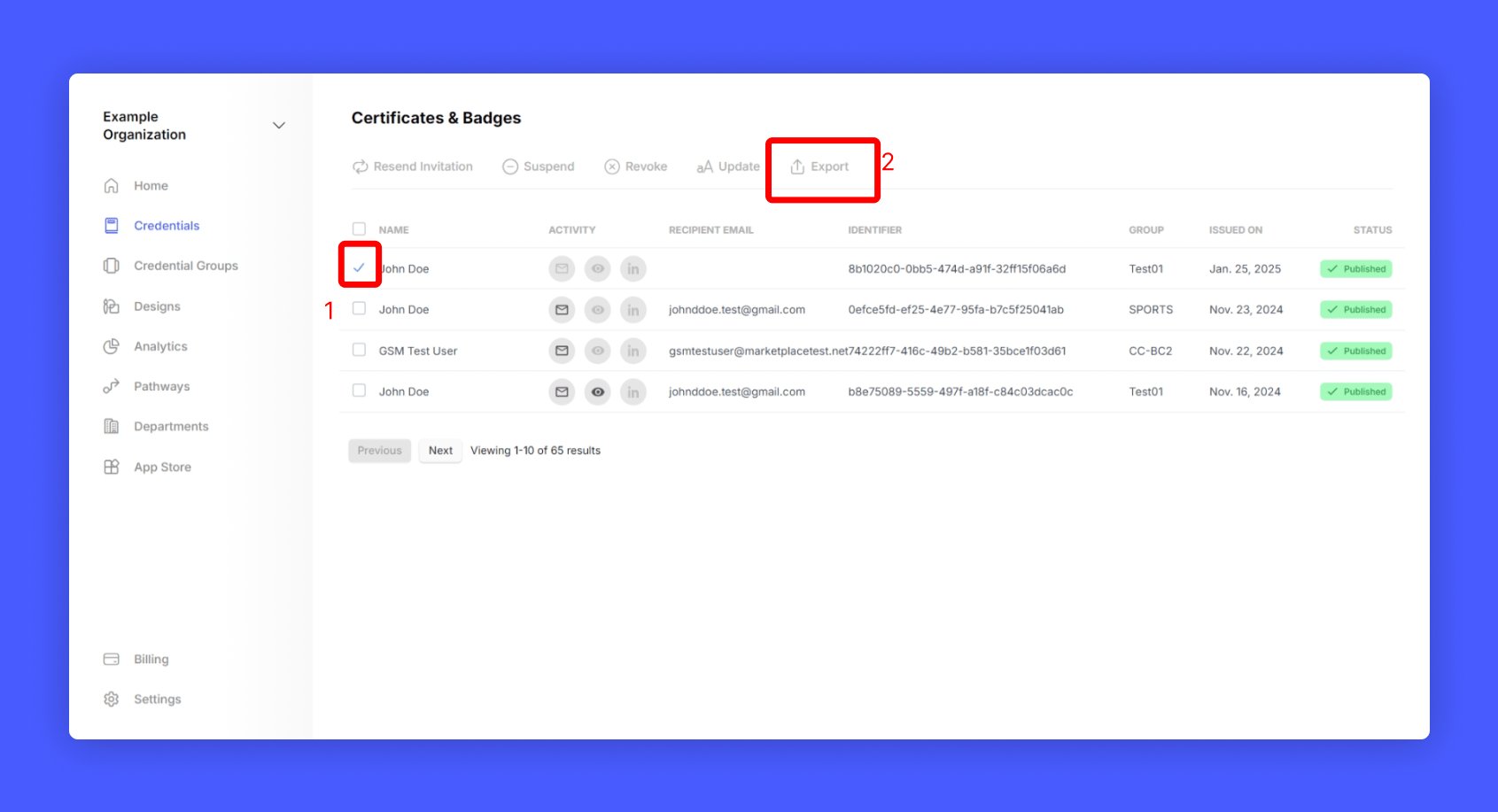
<Steps>
  <Step title="Go to Credentials from home page" />

  <Step title="Select the Credential you want to retrieve the claimable url" />

  <Step title="Click Export credential data">
    <Frame>
      <img src="https://mintcdn.com/hyperstack/hEnRmZQQlgTIvjyK/images/email-less-credential-6.png?fit=max&auto=format&n=hEnRmZQQlgTIvjyK&q=85&s=6f562eb8c6180d8ac1abcc97345488ae" alt="Screenshot of a deployment confirmation message that says All checks have passed." style={{ borderRadius: "0.5rem" }} width="1691" height="917" data-path="images/email-less-credential-6.png" />
    </Frame>
  </Step>

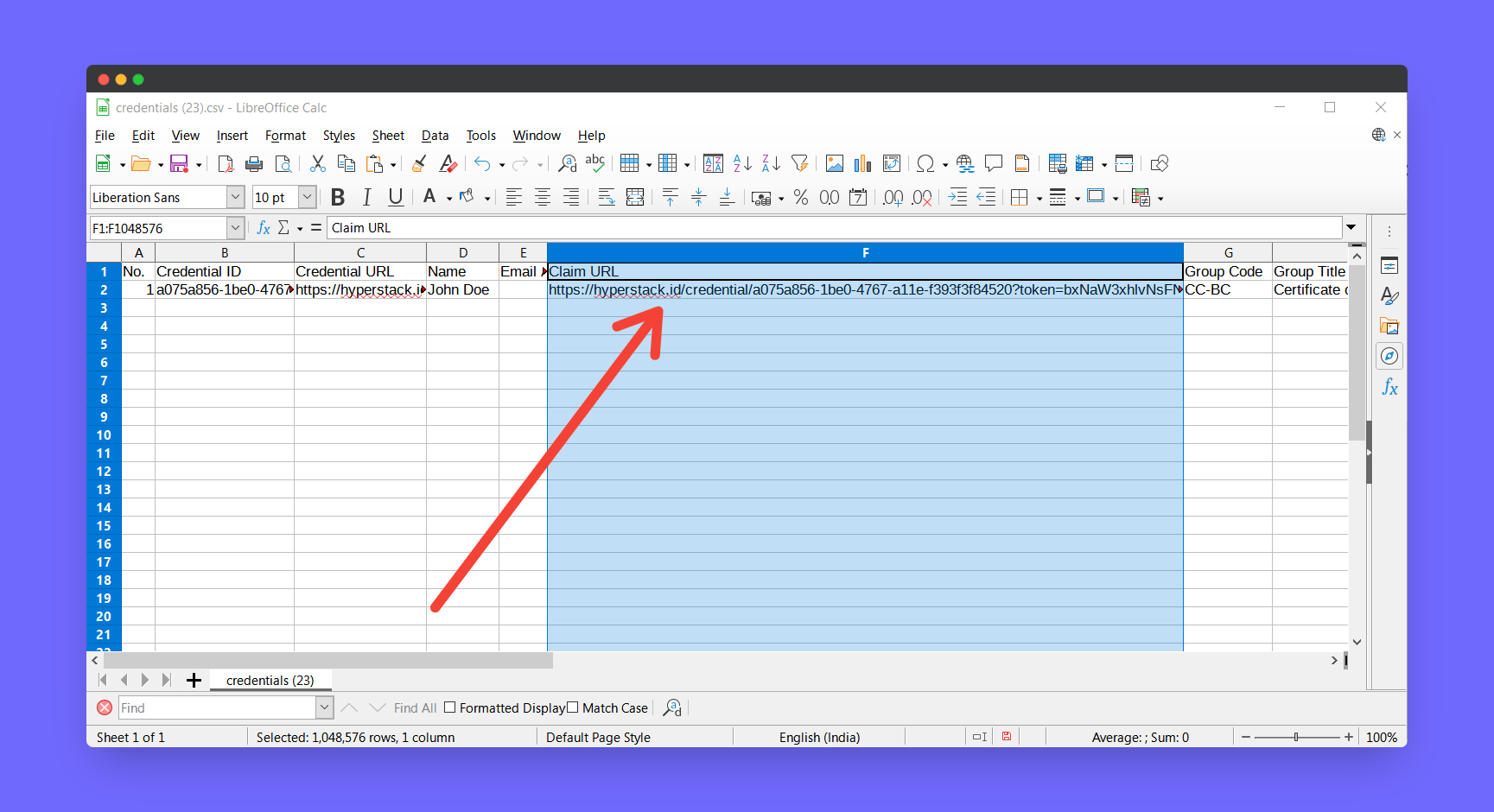
  <Step title="Open the downloaded spreadsheet" />

  <Step title="There you can find the claimable url for your credential" />

  <Step title="You can pass this claimable url to your participant to claim from their end">
    <Frame>
      <img src="https://mintcdn.com/hyperstack/hEnRmZQQlgTIvjyK/images/email-less-credential-7.png?fit=max&auto=format&n=hEnRmZQQlgTIvjyK&q=85&s=6fc17d09ead92c71b5358554bc0bd7d1" alt="Screenshot of a deployment confirmation message that says All checks have passed." style={{ borderRadius: "0.5rem" }} width="1729" height="940" data-path="images/email-less-credential-7.png" />
    </Frame>
  </Step>
</Steps>

## How to claim this credential as a receiver?
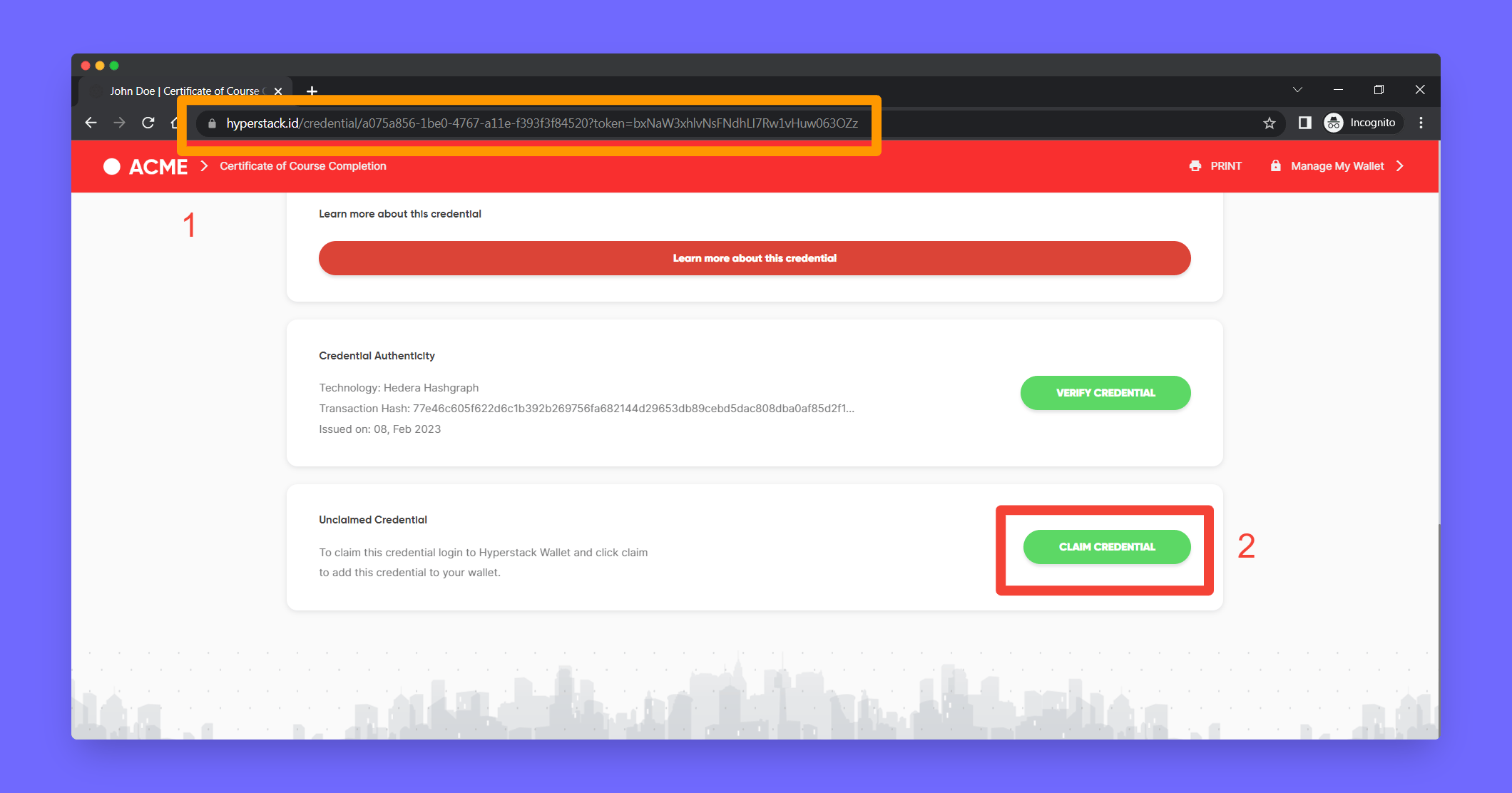
<Steps>
  <Step title="Receiver should open their claimable url in their browser" />

  <Step title="Scroll to bottom and click Claim Credential">
    <Frame>
      <img src="https://mintcdn.com/hyperstack/hEnRmZQQlgTIvjyK/images/email-less-credential-8.png?fit=max&auto=format&n=hEnRmZQQlgTIvjyK&q=85&s=c889339b51e8e7e97478463aa30cadc1" alt="Screenshot of a deployment confirmation message that says All checks have passed." style={{ borderRadius: "0.5rem" }} width="2120" height="1112" data-path="images/email-less-credential-8.png" />
    </Frame>
  </Step>

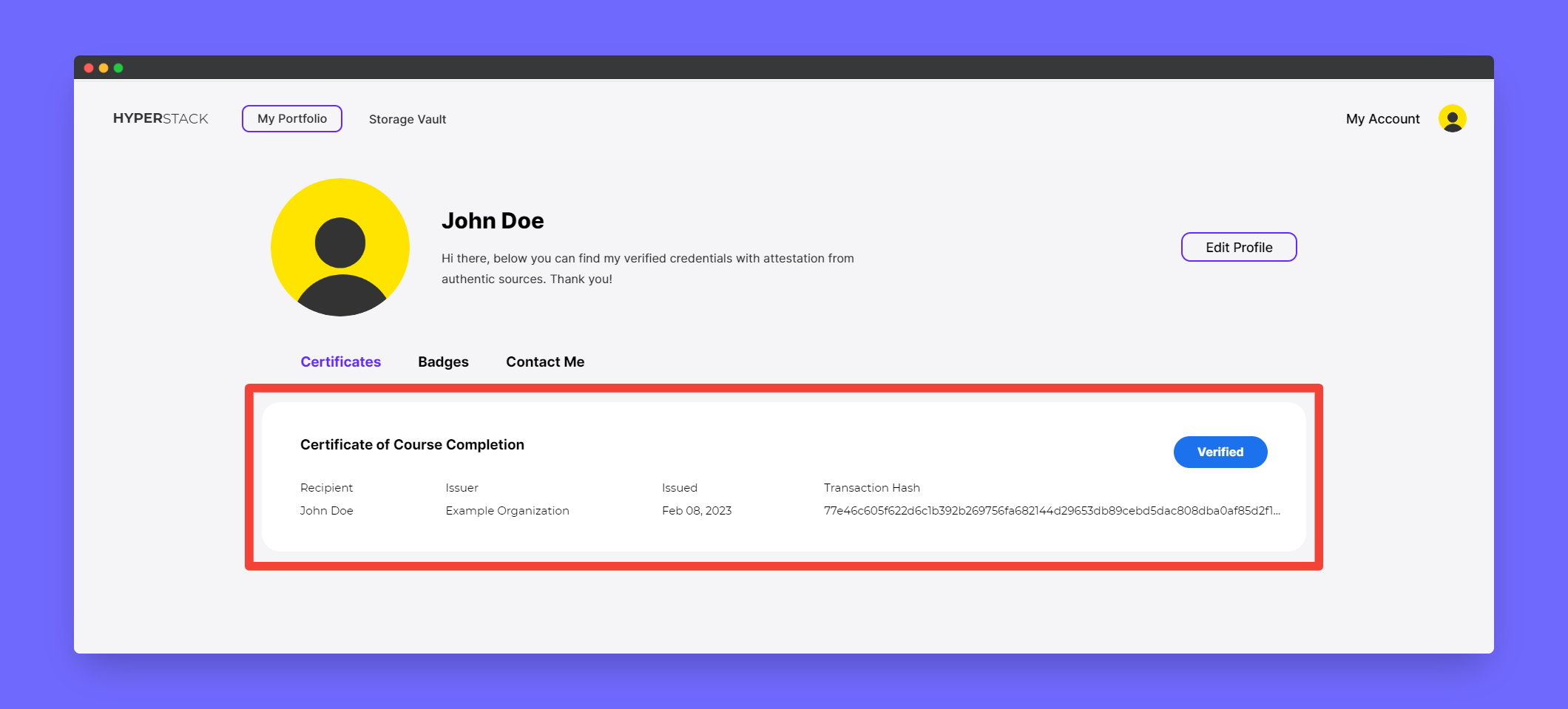
  <Step title="Now the user can see the credential in their own wallet">
    <Frame>
      <img src="https://mintcdn.com/hyperstack/hEnRmZQQlgTIvjyK/images/email-less-credential-9.png?fit=max&auto=format&n=hEnRmZQQlgTIvjyK&q=85&s=0d514c047f9c7b2efaf07aab3e78b654" alt="Screenshot of a deployment confirmation message that says All checks have passed." style={{ borderRadius: "0.5rem" }} width="2120" height="959" data-path="images/email-less-credential-9.png" />
    </Frame>
  </Step>
</Steps>